Posted on

WordPress password changing in the DataBase

It is a simple way to change the password if you can’t reset it through the embedded password recovery procedure.

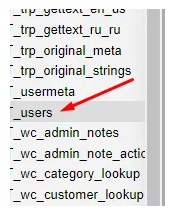
In the phpMyAdmin or other DB management system, we are looking for a table

*_user
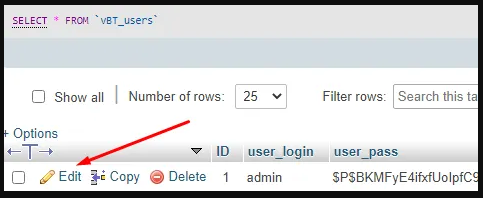
Then we pick Edit in front of the needed to change the user whose password needs to be changed, for example, admin
In expanded fields, we are going to edit the password in the MD5 mode
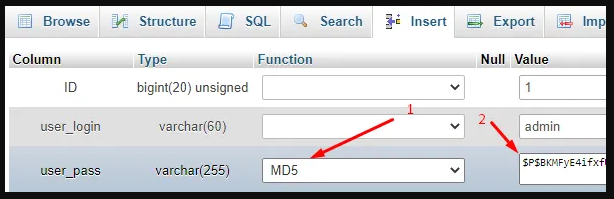
After editing in the right bottom place, push Go to save these changes.

Posted on

Handling user sessions on Windows

How can we set time limits for user sessions on Windows?
Group Policies Editor has to help us to tune values in users’ session limits.
So, we launch this editor by running within the Win+R “Run” programs tool or with the command line:

PS C:\Windows\system32> gpedit.msc

Then we are following the branch in this way:

Local Computer Policy > 
 Computer Configuration > 
  Administrative Templates > 
   Windows Components > 
    Remote Desktop Services > 
     Remote Desktop Session Host > 
      Session Time Limits

There, we could edit, change whatever we need from the users’ sessions limitation tool.