In modern network administration and software development, reaching a remote database, web server, or internal dashboard is a daily necessity. However, exposing these sensitive resources directly to the open internet is a massive security risk.
This is where SSH (Secure Shell) Tunneling—also known as SSH port forwarding—comes into play. It acts as a secure, encrypted transit system, allowing you to route local network traffic through an encrypted SSH connection straight to remote machines.
Whether you are a developer testing APIs or a system administrator managing cloud infrastructure, understanding why SSH tunneling is useful and secure is a foundational networking skill.
What is an SSH Tunnel?
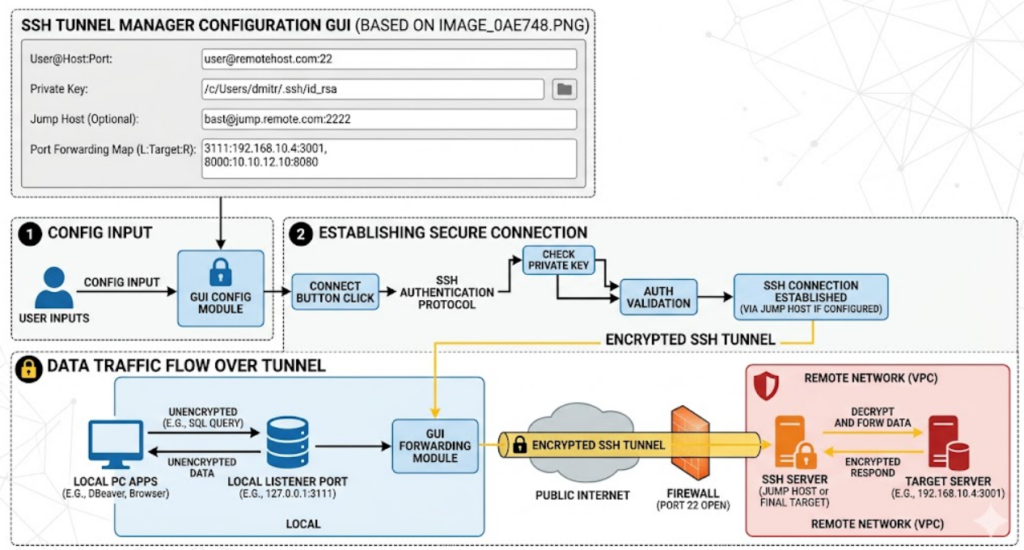
At its core, an SSH tunnel wraps standard, unencrypted application traffic (like HTTP, database queries, or VNC/RDP remote desktop sessions) inside a highly secure SSH protocol wrapper.
Instead of opening a direct public doorway to a database server, you connect to a secure intermediary gateway (often called a Bastion Host or Jump Host). The traffic travels safely over the internet through this encrypted tunnel, completely shielded from outside eavesdropping.
Why SSH Tunneling is Incredibly Secure
The security of an SSH tunnel relies on the battle-tested architecture of the SSH protocol itself. Here is why it provides such robust protection:
- Military-Grade Encryption: SSH uses strong cryptographic algorithms (such as AES or ChaCha20) to encrypt all data moving through the tunnel. If a malicious actor intercepts the packets mid-transit, they see nothing but unreadable, scrambled data.
- Robust Authentication: To establish the tunnel, users must authenticate against the gateway server. This can be strictly enforced using cryptographic SSH key pairs (RSA, ED25519) rather than weak, guessable passwords.
- Elimination of Public Attack Surfaces: By utilizing an SSH tunnel, you do not need to expose your internal application ports (like MySQL’s port 3306 or PostgreSQL’s 5432) to the public internet. The firewall can block all external traffic except for a single, heavily guarded SSH port (usually port 22).
- Prevention of Man-in-the-Middle (MitM) Attacks: SSH relies on a “host key” verification system. The first time you connect, your machine records the unique signature of the remote server. If a hacker tries to spoof the server or redirect your traffic, SSH will immediately halt the connection and alert you.
Why SSH Tunnels are Incredibly Useful
Beyond security, SSH tunneling is an incredibly versatile networking tool that solves everyday engineering hurdles.
1. Bypassing Restrictive Firewalls
If you are working on a corporate network or public Wi-Fi that blocks specific outbound ports, you might find yourself unable to access an external service. Because SSH tunnels condense all traffic into standard SSH traffic, you can route blocked services out through an unrestricted SSH port.
2. Accessing Isolated Internal Resources
Production databases and internal company dashboards are usually locked down inside an isolated Private Virtual Cloud (VPC). With an SSH tunnel, you can bridge your local machine to those private networks. By mapping a local port (e.g., localhost:8080) to the remote target, you can interact with the remote service as if it were running natively on your own laptop.
3. Securing Legacy Protocols
Many older legacy applications communicate in plaintext, broadcasting passwords and sensitive data over the wire. Instead of rewriting obsolete software, you can pipe its traffic through a local SSH tunnel, instantly wrapping the legacy data in modern encryption.
Why You Must Use It: The Bottom Line
Relying on security-by-obscurity or leaving database ports exposed to the open internet “just for quick testing” is an open invitation for automated bots and ransomware attacks.
Using an SSH tunnel is no longer just a best practice; it is a mandatory security baseline. It allows you to maintain a Zero Trust mindset inside your infrastructure, ensuring that only authenticated users with valid cryptographic keys can ever interact with your underlying data.
By centralizing access through a single secure gateway, you drastically reduce your network’s attack surface, keep your development workflows efficient, and guarantee that your data remains strictly confidential from end to end.
Managing Tunnels Efficiently
While standard command-line tools require long, complex strings to manage these connections, you can simplify the process by using visual tools like the open-source SSH Tunnel Manager. It allows you to save your jump hosts, store private keys, and organize complex multi-port configurations inside a clean, reliable desktop GUI.
Order the service https://elitarno.com/shop/ssh-tunnel-manager/