Maintaining an active WordPress site requires keeping your underlying tech stack up to date.
PHP is the engine driving your entire WordPress ecosystem.
As legacy versions lose official security support, updating your WordPress core, plugins, and server PHP runtime to PHP 8.3 is essential for stability, speed, and defense against modern security threats.
Why Upgrading to PHP 8.3 Is Essential
1. Hardened Security & Patching
Running an outdated PHP version (such as PHP 7.4, 8.0, or 8.1) exposes your server to unpatched Remote Code Execution (RCE) and memory leakage vulnerabilities.
Modern environments mandate running supported runtimes like PHP 8.3 to receive ongoing security updates directly from the PHP core team.
2. Significant Performance & Memory Efficiency
PHP 8.3 introduces refined execution loops, improved Just-In-Time (JIT) compilation, and lower overall memory usage per request.
Sites upgrading from PHP 7.x or early 8.x branches often observe faster TTFB (Time to First Byte) and smoother handling of concurrent database-heavy requests.
3. Preventing Fatal Errors (Deprecation & Breaking Changes)
PHP 8.x strictly enforces type checking and removes legacy functions. If your server is force-switched to PHP 8.3 without first updating your WordPress core, theme, and active plugins, you risk encountering Fatal Error or Uncaught TypeError crashes across your site.
Pre-Upgrade Checklist: Updating WordPress & Plugins
Before switching your PHP version inside your hosting panel, follow this sequential update flow:
- Perform a Full Backup: Export both your database (
.sql) and file system (wp-content/). - Update WordPress Core: Ensure your site is running WordPress 6.4 or later (WordPress 6.7+ recommended).
- Update All Active Plugins & Themes: Modern plugin maintainers update their codebases to resolve PHP 8.3 deprecation warnings.
- Audit Abandoned Extensions: Replace any legacy plugins that have not received an update in over 2 years, as they are likely incompatible with PHP 8.3.
How to Update Your Site’s PHP Version to PHP 8.3 in FastPanel
Once your WordPress application layer is fully updated, switch your PHP processing engine using FastPanel:
Assign PHP 8.3 to Your WordPress Site
- Log in to your FastPanel instance as an administrator.
- Open the left sidebar menu and navigate to Control Panel -> YourSite -> Settings -> Backend (PHP, Reverse proxy, etc.):
- Backend type: select PHP and Handler: PHP-FPM, Version: 8.3, and Save
Post-Upgrade Verification
- Check Frontend & Admin Panel: Clear your server and object cache, then verify essential features like WooCommerce checkout, contact forms, and admin logins.
- Activate temporary debug mode and log writing:
- Add in wp-config.php:
define( 'WP_DEBUG', true);
define( 'WP_DEBUG_LOG', true);
define( 'WP_DEBUG_DISPLAY', true);


/* That's all, stop editing! Happy publishing. */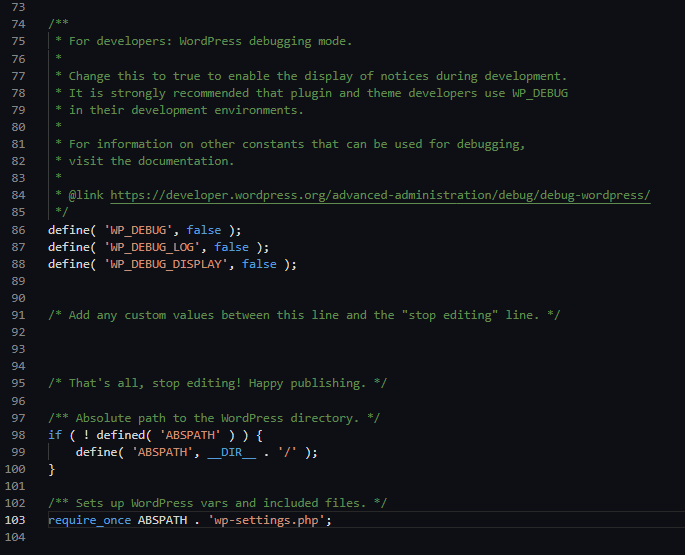
- Review
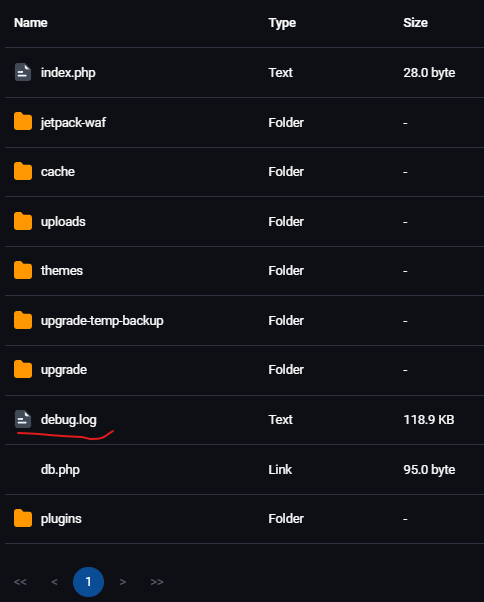
debug.log: EnableWP_DEBUGtemporarily inwp-config.phpto spot any hidden deprecation warnings generated by custom theme code. - The debug.log file can be found in the wp-content folder
- After troubleshooting and checks, turn WP_DEBUG values to false